0 → 1 PRODUCT DESIGN

Trap Garden

Trap Garden

Trap Garden

Simplifying garden maintenance through
planning, management and tracking.

Trap Garden creates community gardens, but beginner gardeners struggle to sustain them.

The Trap Garden is a nonprofit organization that empowers low-income communities to overcome food insecurity by supporting the creation of community gardens, promoting healthy eating, and providing educational resources.

I worked with my student-led team at Cal Blueprint to design a web app for Trap Garden to help individuals, organizations, and schools simplify the gardening process through planning, management, and tracking.

ROLE

Sole Designer

TEAM

1 Project Manager,
6 Developers, 1 Designer

TIMELINE

Aug 2024 - May 2025

TOOLS

Figma

DIGGING UP ROOT PROBLEMS

Interviewing 15 gardeners to understand why garden maintenance is difficult.

Starting a garden is easy—maintenance is where it wilts. So, we simplified it.

My team and I interviewed beginner gardeners who worked with Trap Garden to start their community gardens. Through this interview, we synthesized the 3 key pain points to develop our design goal.

PLANTING NEW STRATEGIES

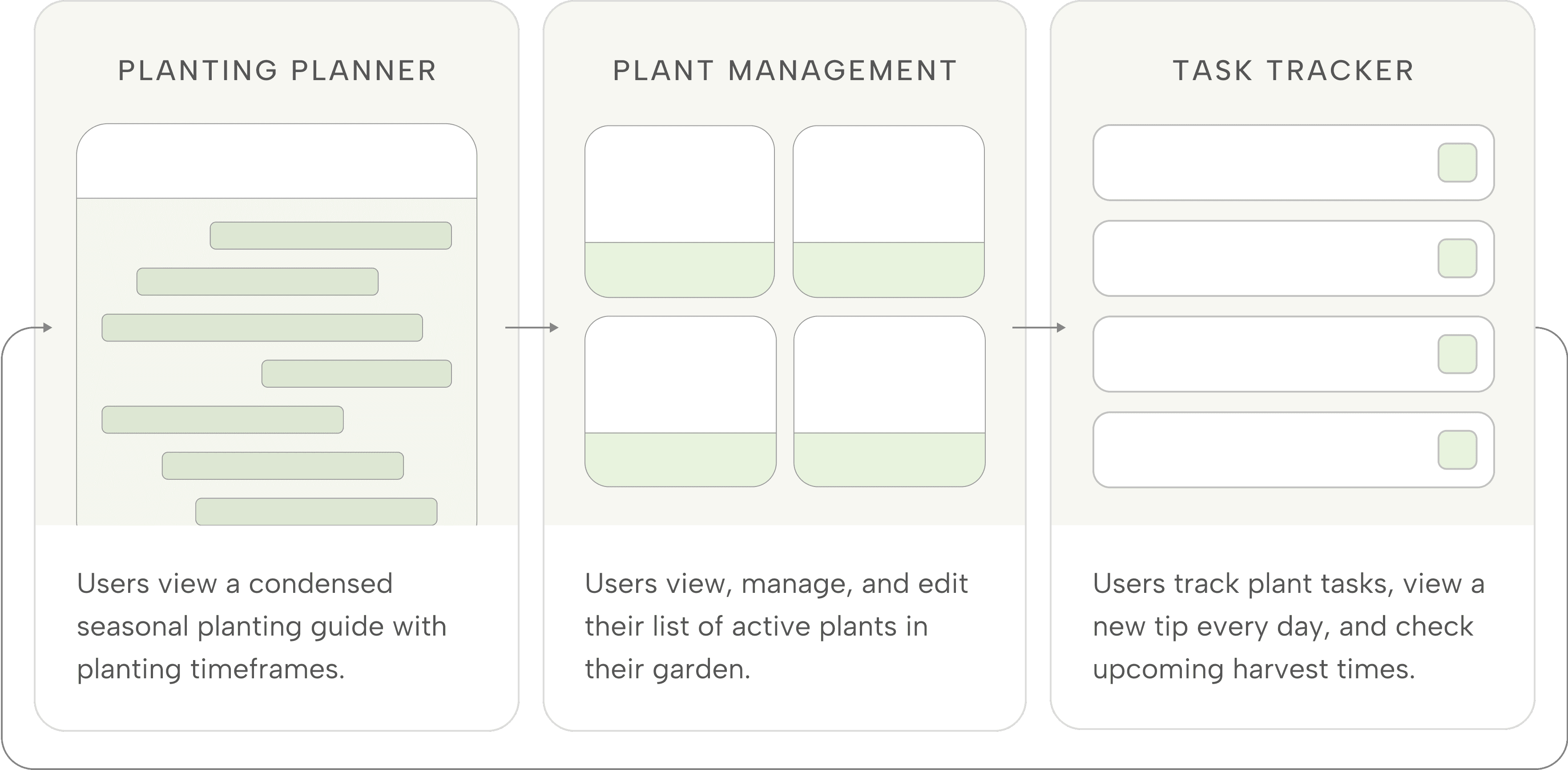
We narrowed down 3 key features to build a plan, manage, and track habit-building loop.

User interviews showed that first-time gardeners felt overwhelmed by the lack of in-person support and number of tasks required, so we explored designing a habit-building system to simplify their workflow.
DESIGN DECISIONS

How might we design a seasonal planting planner that is easy to understand?

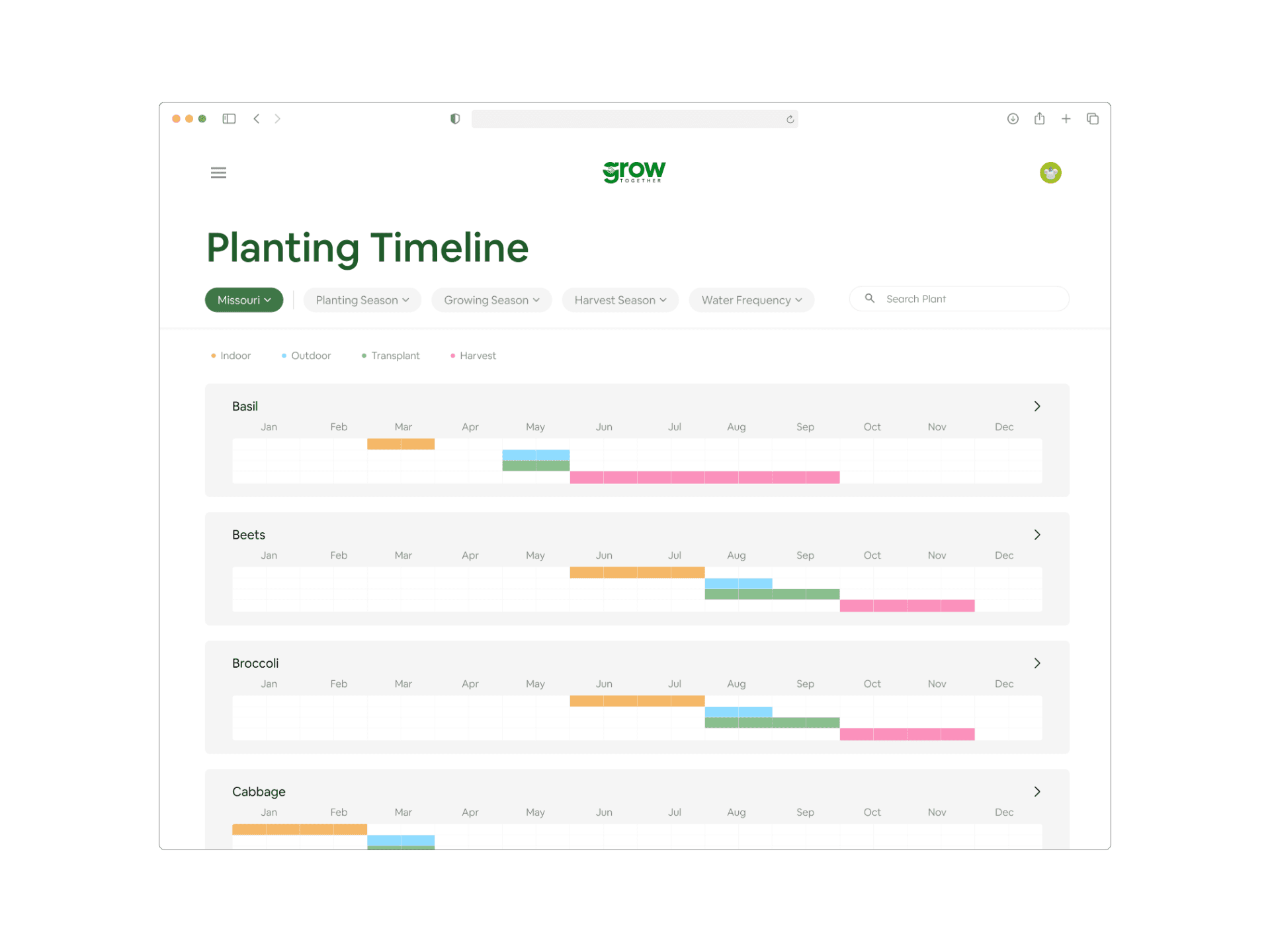
User interviews revealed that existing planting planners were overwhelming, so I designed a simplified table showing planting and harvest timelines. Each plant card can be expanded into a detailed plant care page.

INSPIRATION

ONLINE PLANTING PLANNERS

TAILORED DESIGN

INDIVIDUAL PLANTING PLANNER CARD

TAILORED DESIGN

INDIVIDUAL PLANTING PLANNER CARD

How can users be guided to easily select and manage plants for their garden?

My team and I debated on how to create an intuitive select flow for the plant management page. I researched several platforms that had a similar model like Ebay and Pinterest to theorize an ideal experience for users.

We explored two select flows: a shopping cart and mass selection model.

SHOPPING CART

Users add plants individually with the option to adjust quantities.

Flexible quantity control

Creates a transaction-like experience

Inefficient for adding multiple unique plants

MASS SELECTION

Users select multiple unique plants in two steps.

Quick batch addition

Supports exploration and planning

Reflects a gardener workflow

No quantity control

SHOPPING CART

Users add plants individually with the option to adjust quantities.

Flexible quantity control

Creates a transaction-like experience

Inefficient for adding multiple unique plants

MASS SELECTION

Users select multiple unique plants in two steps.

Quick batch addition

Supports exploration and planning

Reflects a gardener workflow

No quantity control

CHOSEN DECISION

After testing multiple iterations and conducting usability testing, we decided on mass selection because:


  1. It better reflected a gardener’s workflow of browsing, planning, and tracking plants in batches rather than individual quantities.

  2. It avoids making the user experience feel like an e-commerce platform and instead imitates a more plant managerial experience.

CHOSEN DECISION

After testing multiple iterations and conducting usability testing, we decided on mass selection because:


  1. It better reflected a gardener’s workflow of browsing, planning, and tracking plants in batches rather than individual quantities.

  2. It avoids making the user experience feel like an e-commerce platform and instead imitates a more plant managerial experience.

How might we turn a requested feature into a more effective way to track tasks?

Starting a garden is easy—maintenance is where it wilts. So, we simplified it.

Our NPO requested a weekly calendar to help track planting and harvesting dates but after receiving user feedback, it appeared to be redundant. I traced back to our design goals to explore a more functional alternative.

INITIAL DESIGN

CALENDAR VIEW

NEW DESIGN

WEEKLY PROGRESS TRACKER

Condensed calendar view

Incentive to complete tasks

NEW DESIGN

WEEKLY PROGRESS TRACKER

Condensed calendar view

Incentive to complete tasks

SPROUTED SOLUTION

Final Designs

The screens shows the plan, manage, and track habit-building loop in order, and how the user engages with each step.

Each screen shows the plan, manage, and track habit-building loop, and how the user engages with each step.

  1. PLAN YOUR PLANTS

Simplified planting planner with detailed care information

Simplified planting planner with detailed care information

To get started, users browse the planner to find plants suited to their growing conditions, check harvest seasons to plan ahead, and access detailed care information to guide their garden planning.

  1. MANAGE YOUR PLANTS

Personalized plant manager for tracking plants in one place

Personalized plant manager for tracking plants in one place

After planning, users can easily add plants to their personal garden to view, edit, and organize.

  1. TRACK YOUR PLANT TASKS

Daily plant tracker for tasks, tips, & harvests

After adding plants to their garden, users can track upcoming tasks by category and planting date, while viewing daily rotating plant tips for guidance.

  1. TRACK YOUR PLANTS

Simplified planting planner with detailed care information

To get started, users browse the planner to find plants suited to their growing conditions, check harvest seasons to plan ahead, and access detailed care information to guide their garden planning.

  1. MANAGE YOUR PLANTS

Personalized plant manager for tracking plants in one place

After planning, users can add plants to their manager to view, edit, and organize their garden lineup.

  1. TRACK YOUR PLANT TASKS

Daily plant tracker for tasks, tips, & harvests

After adding plants to their garden, users can track upcoming tasks by category and planting date, while viewing daily rotating plant tips for guidance.

AND…REPEAT! ⟳

Every time users finish a season of planting, the user would restart the same cycle: plan, manage, and track.

AND…REPEAT! ⟳

Every time users finish a season of planting, the user would restart the same cycle:
plan, manage, and track.

TAKEAWAYS & REFLECTIONS

A few seeds of wisdom I picked up

In my first end-to-end product design experience, collaborating with a cross-functional team and working directly with Trap Garden taught me lessons I’ll carry into the future.

USER EMPATHY SHAPES
IMPACTFUL DESIGN

We learned to make every decision with the user in mind through constant user interviews and feedback.

BE RECEPTIVE & ADAPTIVE
TO CHANGES

Projects rarely go exactly as planned, so we constantly learned to adjust and re-scope features with the NPO.

THANKS FOR STOPPING BY!⋆˚࿔
XOXO, KYRENE

THANKS FOR
STOPPING BY!⋆˚࿔
XOXO, KYRENE

THANKS FOR STOPPING BY!⋆˚࿔
XOXO, KYRENE