0→1
SHIPPED
Expanding
support
in
Immigration Justice Project
Immigration
Justice Project
Immigration
Justice Project
Streamlining immigration legal support for faster onboarding and case matching
Bringing clarity to crowded team schedules through adaptive layouts and custom view controls.
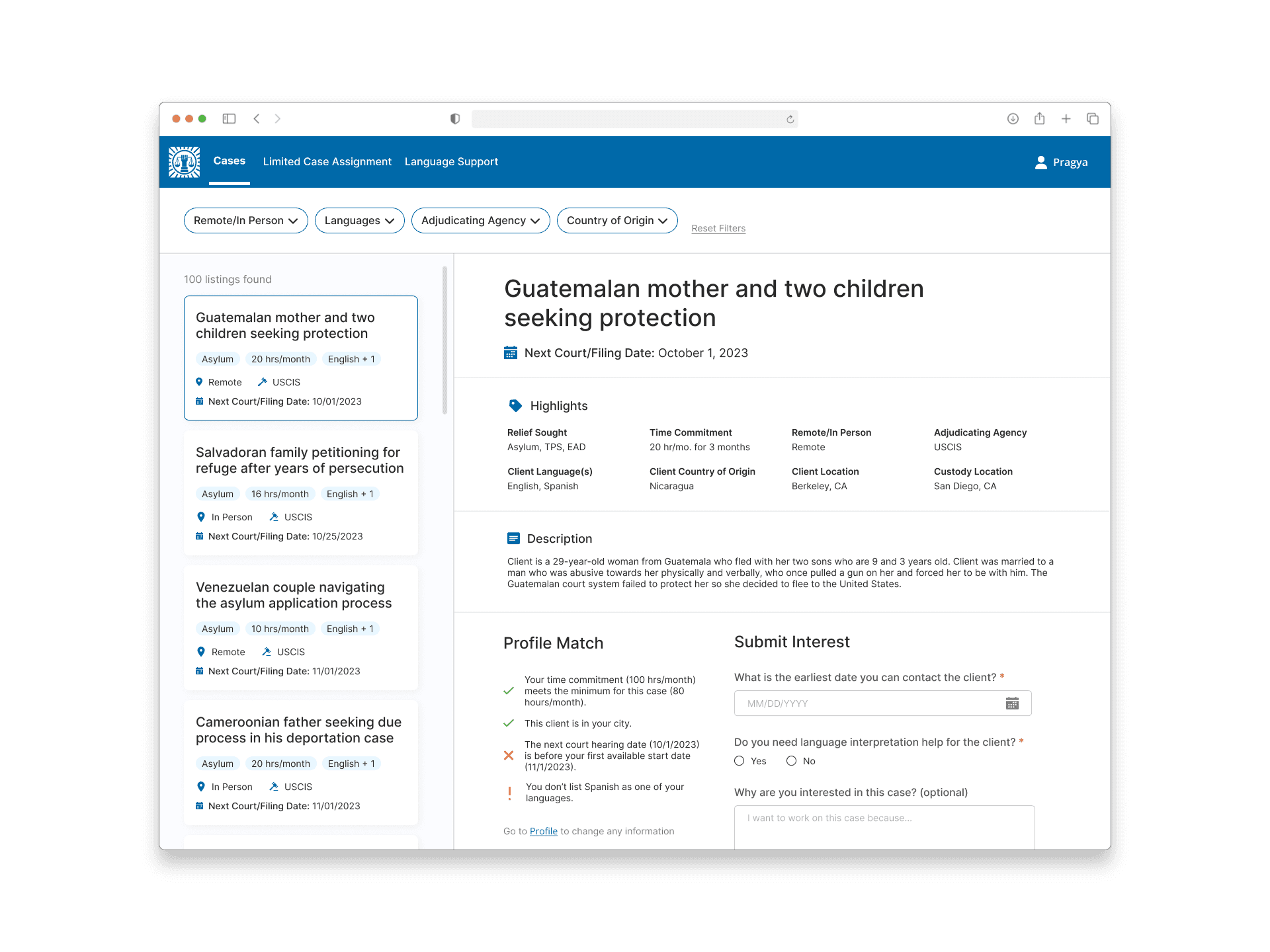
IJP provides legal support to immigrants, but the current process delays the time-sensitive help.
The Immigration Justice Project (IJP) is a non-profit organization that promotes due process and access to justice by providing high-quality legal services for indigent immigrants and asylum seekers.
My team at Blueprint built a web app that lets attorneys and volunteers browse and apply for cases, while admins can review applications and match individuals to cases, ensuring faster support and a more organized, equitable distribution of legal resources.
ROLE
Sole Designer
TEAM
I Project Manager,
5 Developers, 1 Designer
TIMELINE
Jan 2024 - May 2024
TOOLS
Figma
THE PROBLEM
Manually onboarding and matching users to legal cases is inefficient and time-consuming.
Currently, a single administrator matches volunteers to legal cases on paper and sends email confirmations individually, creating delays that slow legal support for immigrants in urgent need.
USER RESEARCH & IDEATION
How might we help users quickly onboard and browse available cases to represent?
We focused on designing a solution for 4 user groups: IJP administrators, attorneys, legal volunteers, and translators and interpreters. To inform the design, we conducted user interviews to uncover what issues have impacted them the most during the process.

THE STRATEGY
Streamline the onboarding and case matching process to provide immigrants with timely legal representation.
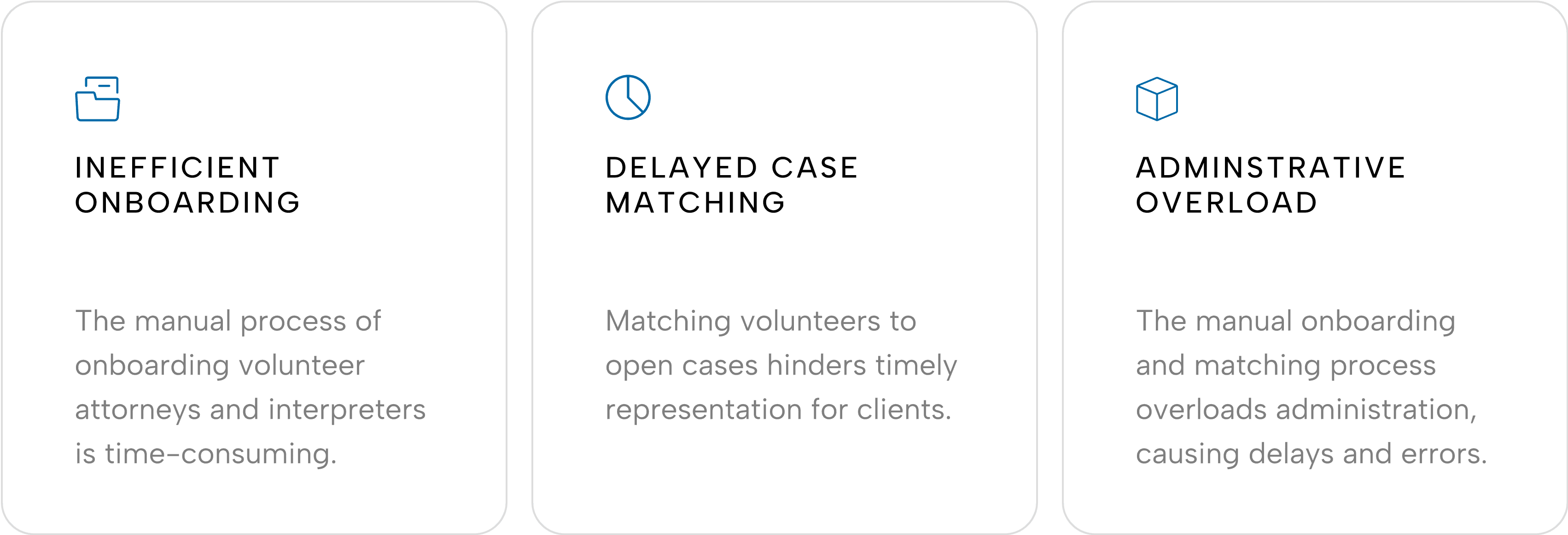
The user interviews led us to identify 3 key points that are lacking in the current system, yet are important for users during the onboarding and case matching process.

USER EXPERIENCE DEVELOPMENT
Designing an effective onboarding process to address different user groups
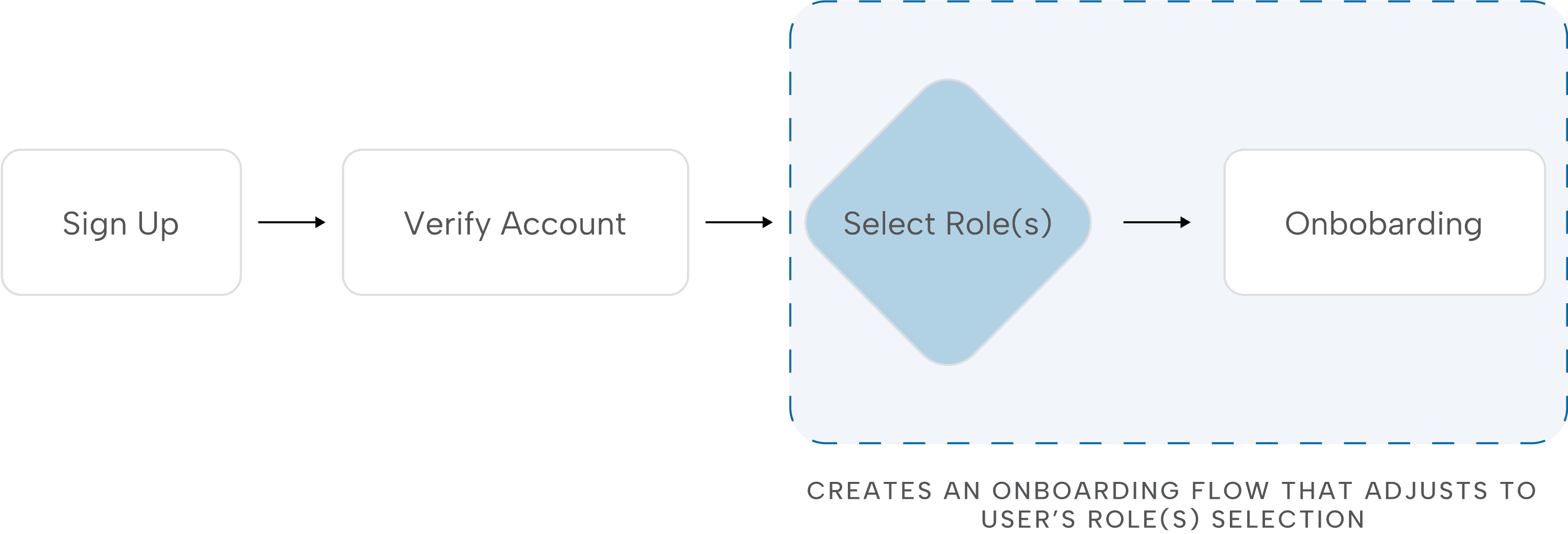
Through multiple iterations of the user flow, we concluded that the most efficient approach was to let users first select their roles, which would then tailor the onboarding form and eliminate irrelevant inputs.
USER FLOWCHART
SELECTING ROLES
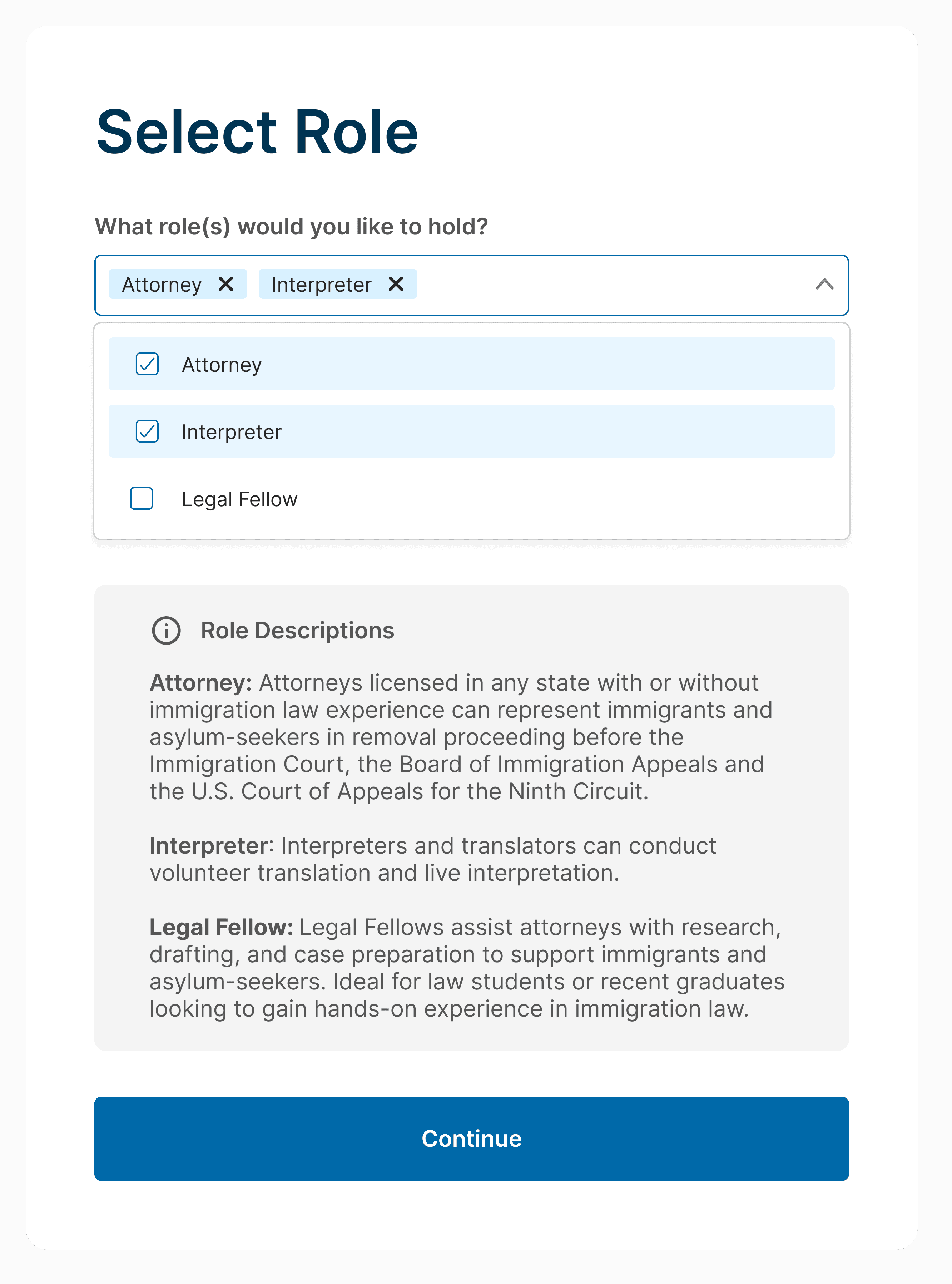
Designing an adaptive role selection flow to optimize the onboarding forms
The first design used preset role combinations, which caused confusion during user testing. The new checklist of roles offers more flexibility and clarity and improves onboarding efficiency.
OLD DESIGN
PRESET ROLE COMBINATIONS


NEW DESIGN
PRESET ROLE COMBINATIONS
BROWSING CASES
We explored formats to simplify and optimize the case matching process.
We referred to job posting platforms like LinkedIn and Handshake that would present all 3 different categories: cases for attorneys, limited case assignments for volunteers, and language support for translators & interpreters.
FORMAT 1
Users can browse all available opportunities at once with filter options to personalize opportunities.
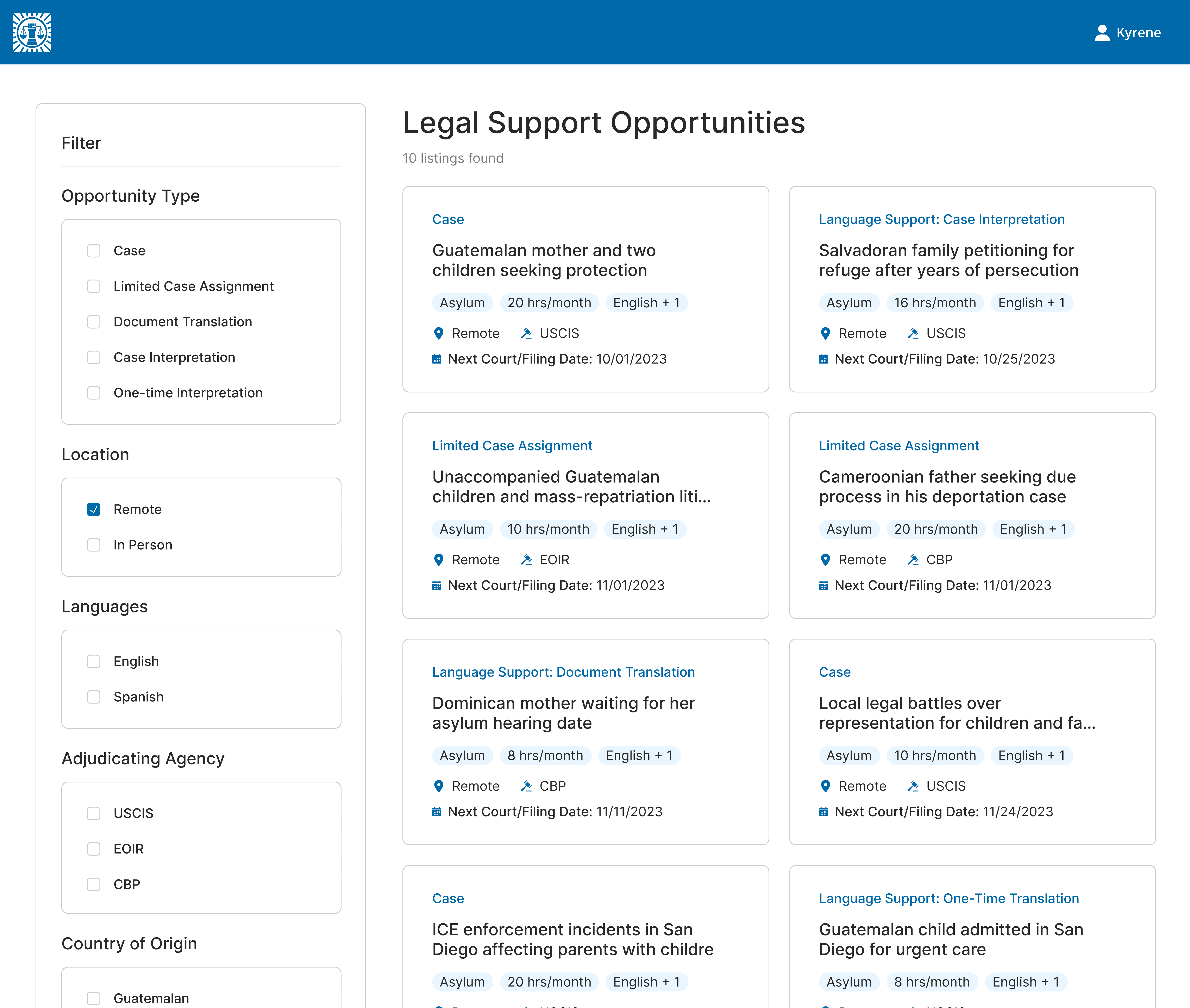

Full visibility

High interaction cost
Overwhelming
We conducted usability testing on Format 1 which displayed all opportunities, offering transparency. However, we received feedback that this format was overwhelming and required frequent filtering.
So, we iterated with Format 2 which separated the opportunities into 3 tabs to target each user group.
FORMAT 2
Users can browse through different tabs with filters to explore opportunities suited to their expertise.

Better organization
Reduced overwhelm
Fragmented experience
CHOSEN DECISION
Ultimately, we chose Format 2 for its organization and clarity to create a more efficient user experience.
USER RESEARCH & IDEATION
How might we help users quickly onboard and browse available cases to represent?
We focused on designing a solution for 4 user groups: IJP administrators, attorneys, legal volunteers, and translators and interpreters. To inform the design, we conducted user interviews to uncover what issues have impacted them the most during the process.
THE STRATEGY
Streamline the onboarding and case matching process to provide immigrants with timely legal representation.
The user interviews led us to identify 3 key points that are lacking in the current system, yet are important for users during the onboarding and case matching process.
USER EXPERIENCE DEVELOPMENT
Designing an efficient onboarding process to address different user groups
Through multiple iterations of the user flow, we concluded that the most efficient approach was to let users first select their roles, which would then tailor the onboarding form and eliminate irrelevant inputs.
USER EXPERIENCE DEVELOPMENT
USER FLOWCHART

SELECTING ROLES
Designing an adaptive role selection to offer flexibility
The first design used preset role combinations, which caused confusion during user testing. Afterwards, we reiterated the design to create a checklist of roles which felt more flexible, while serving the same function.
OLD DESIGN
PRESET ROLE COMBINATIONS
NEW DESIGN
ROLE CHECKLIST
BROWSING CASES
We explored formats to bring transparency to the case matching process.
We referred to job posting platforms like LinkedIn and Handshake that would present all 3 different categories: cases for attorneys, limited case assignments for volunteers, and language support for translators & interpreters.
FORMAT 1
Users can browse all available opportunities at once with filter options to personalize opportunities.
Full visibility
High interaction cost
Overwhelming
We conducted usability testing on Format 1 which displayed all opportunities, offering transparency. However, we received feedback that this format was overwhelming and required frequent filtering.
So, we iterated with Format 2 which separated the opportunities into 3 tabs to target each user group, while still putting transparency at the forefront.
FORMAT 2
Users can browse through different tabs with filters to explore opportunities suited to their expertise.
Better organization
Reduced overwhelm
Fragmented experience
Fragmented
experience
CHOSEN DECISION
Ultimately, we chose Format 2 for its organization and clarity to create a more transparent opportunity browsing user experience.
Final Designs
A web app to support the Immigration Justice Project through onboarding and case browsing.
ONBOARDING USERS
BROWSING CASES
SUBMITTING INTEREST
Users submit their interest in why they are suitable for each case
Users view open cases and can also filter by certain attributes of the cases
Users create a profile with background information and relevant experience to support case matching.
THE SOLUTION
Final Designs
A web app to support the Immigration Justice Project through onboarding and case browsing.
ONBOARDING USERS
Users create a profile with background information and relevant experience to support case matching.
BROWSING CASES
Users view open cases and can also filter by certain attributes of the cases
SUBMITTING INTEREST
Users submit their interest in why they are suitable for each case
